Designing a system for 10 users is very different from designing one for 10 million.
Scaling isn’t just about “adding more servers” — it’s an architectural challenge: where the data flows, how it’s processed, and how the system holds under pressure.
In this article, I’ll share a step-by-step approach to building a scalable system — not through formulas or dogma, but through real-world design thinking shaped by hands-on experience.
1. Start with a Single Server
In the early stage, the entire system often runs on a single machine.
The backend app, web server, database, and static files — everything lives together.
It’s simple, easy to deploy, and good enough for testing features or demo purposes.
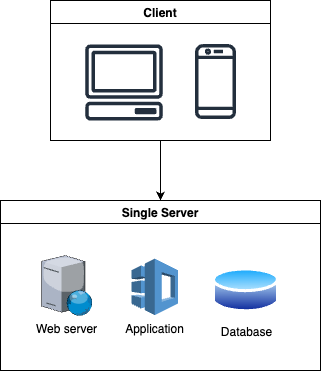
Pros:
- Quick to set up and get running
- No infrastructure management needed
- No need to split anything yet
Cons:
- Hard to scale when traffic grows
- One failure can bring down the whole system
- Not ideal if you need to scale components independently
A single server is fine while the system is small.
But once traffic increases — or you need better performance and reliability — you’ll need to start breaking things apart.
2. Split Backend and Database
When traffic starts to grow, the first bottleneck often comes from the database.
Instead of running everything on one machine, you can separate the backend application and the database into different servers:
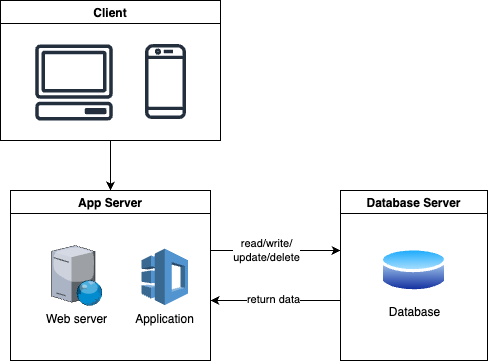
The app server handles web requests and business logic, while the database runs on its own machine, optimized for storage and queries.
Pros:
- Reduces resource contention between app and DB
- Easier to scale backend or database separately
- Clearer architecture separation
Cons:
- Slightly more complex setup
- Network latency between app and DB
- Need basic monitoring/logging for two servers
This split is a foundational move. Most real-world systems start scaling by moving the database out first, before touching anything else.
3. Add More App Servers Behind a Load Balancer
As traffic grows, a single app server won’t be enough.
You scale horizontally by adding more app servers, and placing a load balancer in front of them:
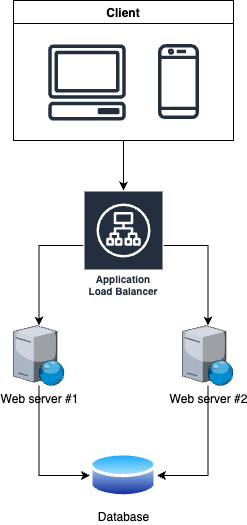
The load balancer acts as a smart router. It distributes incoming traffic across available app servers to keep things running smoothly.
- If App Server 1 gets overloaded, traffic is redirected to App Server 2 or others.
- If a server goes offline, the load balancer automatically reroutes traffic to healthy ones.
- This helps the system stay available even under high load or partial failure.
Pros:
- Handles higher traffic volumes
- No downtime if one app server fails
- Easy to scale app servers up or down
Cons:
- App servers must be stateless (no session stored locally)
- Load balancer adds some infrastructure complexity
- Shared state (like sessions) may require Redis or JWT
This setup is a major step toward making your system scalable and resilient — and it’s how most production systems operate today.
4. Add Caching
Even with multiple app servers and a dedicated database, as traffic keeps growing, the database will often become the next bottleneck.
Most applications serve a lot of repeated queries – like fetching the same user profile or trending posts. Instead of hitting the database every time, we can cache frequently accessed data in memory.

A cache (like Redis or Memcached) stores key-value data in memory for fast access. When the app receives a request, it first checks the cache:
Cache hit: return data directly from cache (fast, cheap).
Cache miss: fetch data from database, then store it in cache for next time.
What to cache
Data that doesn’t change often, e.g. product details, user profiles
Results of expensive queries (aggregations, joins)
Frequently accessed lists like trending posts or top search results
What not to cache
Highly dynamic data that changes every second (stock prices, counters)
Data with strict consistency requirements (e.g. bank account balances)
Sensitive information that shouldn’t stay in memory
Pros:
Greatly reduces database load
Significantly faster response times
Cheap to scale (in-memory operations are fast)
Cons:
Cached data can become stale (need proper expiration)
Cache layer adds complexity (what to cache, when to invalidate)
Cache failures can lead to cache stampede if not handled carefully
Caching is one of the highest ROI optimizations you can add. Almost every large-scale system relies heavily on caching to stay fast and cost-efficient.